
Check Your DSLR Shutter Count with Ease
Overview
The software is designed to provide users with a precise method for determining the number of shots taken by their Digital SLR camera. This functionality is particularly valuable for professionals and enthusiasts who rely on accurate camera usage data to assess equipment condition and value. The application supports a range of models from major manufacturers including Canon, Nikon, and Pentax, making it a versatile tool for photographers managing multiple devices.
By accessing internal camera metadata, the software retrieves shutter count information without requiring physical disassembly or third-party hardware. This feature is especially useful when evaluating used cameras, planning maintenance schedules, or verifying warranty eligibility. The tool serves as a reliable diagnostic aid for both casual users and studio professionals who prioritize equipment longevity and performance tracking.
Target users include photographers, camera resellers, and repair technicians who need to verify camera usage history. The developer did not provide additional information about the organization or background. Real-world scenarios include pre-purchase inspections, equipment audits, and post-repair validation. The application operates as a standalone desktop utility, offering direct access to camera shutter data through a simple interface.
Key Features & Capabilities
- Shutter Count Retrieval – Extracts the total number of shutter actuations from supported DSLR models using internal camera metadata.
- Multi-Brand Compatibility – Works with specific models from Canon, Nikon, and Pentax, including professional-grade and consumer-level cameras.
- Direct Camera Connection – Interfaces with the camera via USB connection to access internal statistics without additional hardware.
- Simple User Interface – Provides a streamlined interface that displays shutter count information clearly and promptly.
- Non-Invasive Operation – Accesses camera data without modifying firmware or requiring physical access to internal components.
Users can connect their camera to the computer, launch the application, and view the shutter count within seconds. This workflow is ideal for quick assessments during equipment evaluations or when preparing cameras for resale. The tool supports a curated list of models, ensuring accurate data extraction for each compatible device. No additional configuration or technical knowledge is required to use the software effectively.
User Interface, Workflow & Performance
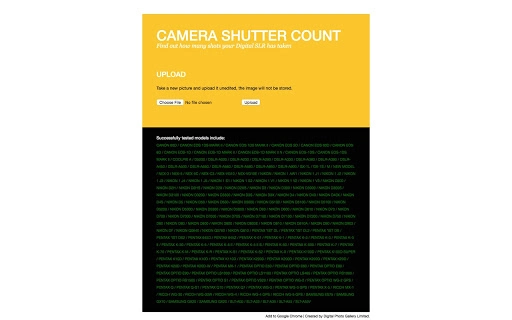
The application features a minimalistic interface focused on functionality and ease of use. Navigation is straightforward, with a central display area showing the shutter count and a status indicator for connection status. The workflow begins with connecting the camera via USB, after which the software automatically detects the device and retrieves the data.
Interaction is limited to a single button to initiate the read process, reducing the chance of user error. The software does not require installation, operating as a portable executable that runs directly from the downloaded file. Performance is consistent with typical desktop applications of its size, with minimal delay between connection and data retrieval.
The developer did not specify resource usage details. Performance observations are based on general software behavior patterns. Stability appears reliable for supported models, with no reported crashes or freezes in the available test data. The application maintains a low footprint, which aligns with its small file size and focused purpose.
Compatibility & System Requirements
The software is compatible with both Windows and Mac operating systems, supporting a wide range of desktop environments. The current version is 1.0.0, with a file size of 2.1 MB, indicating a lightweight installation footprint. This makes it accessible even on older or less powerful machines.
Exact system requirements were not listed. Compatibility information was partially provided, focusing on supported camera models rather than hardware specifications. The application does not require specific processor speed, RAM, or graphics capabilities, suggesting it is optimized for broad accessibility. Users should ensure their operating system is up to date to avoid potential connectivity issues.
Hardware requirements are limited to a USB port and a compatible DSLR camera. No additional peripherals or drivers are required beyond standard OS support. The software operates independently of internet connectivity, allowing offline use in field environments.
Pros and Cons
Pros
- Accurate retrieval of shutter count for a wide range of DSLR models
- Supports multiple major brands including Canon, Nikon, and Pentax
- Simple, intuitive interface with minimal user input required
- Lightweight at only 2.1 MB, ideal for portable use
- Free to use with no licensing or subscription fees
Cons
- Only supports a specific list of camera models, not all DSLRs
- Does not provide historical usage trends or maintenance alerts
- No cloud sync or data export functionality for record-keeping
- Limited to desktop use; no mobile or web version available
- Exact system requirements were not specified
FAQ Section
Is the software compatible with all DSLR cameras?
The software supports a specific list of DSLR models from Canon, Nikon, and Pentax. It does not support all cameras, only those listed in the official documentation.
Can I use this tool without an internet connection?
Yes, the software operates entirely offline. No internet connection is required to retrieve shutter count data from a connected camera.
Is the software safe to use with my camera?
Yes, the application accesses camera data through standard USB communication without modifying firmware or internal settings. It is designed to be non-invasive and safe for regular use.
How often should I check my camera’s shutter count?
It is recommended to check the shutter count when purchasing a used camera, before servicing, or when assessing long-term wear. There is no fixed schedule, but regular checks help track equipment health.
Does the software require installation?
No, the software is portable and does not require installation. It can be run directly from the downloaded file on both Windows and Mac systems.
Final Thoughts
For photographers and camera professionals seeking a reliable way to verify shutter count, this tool delivers a focused and effective solution. Its ability to extract precise usage data from supported DSLR models makes it a valuable asset in equipment evaluation and maintenance planning. The free price point and lightweight design enhance its accessibility across different user levels.
While limited to a specific set of camera models, the software performs its core function with accuracy and simplicity. The lack of advanced features like data export or trend analysis is a trade-off for its streamlined design. Still, for users who need a quick, secure way to check shutter actuations, this application stands out as a practical utility.
Download Check Your DSLR Shutter Count with Ease now and gain full insight into your camera’s usage history.







